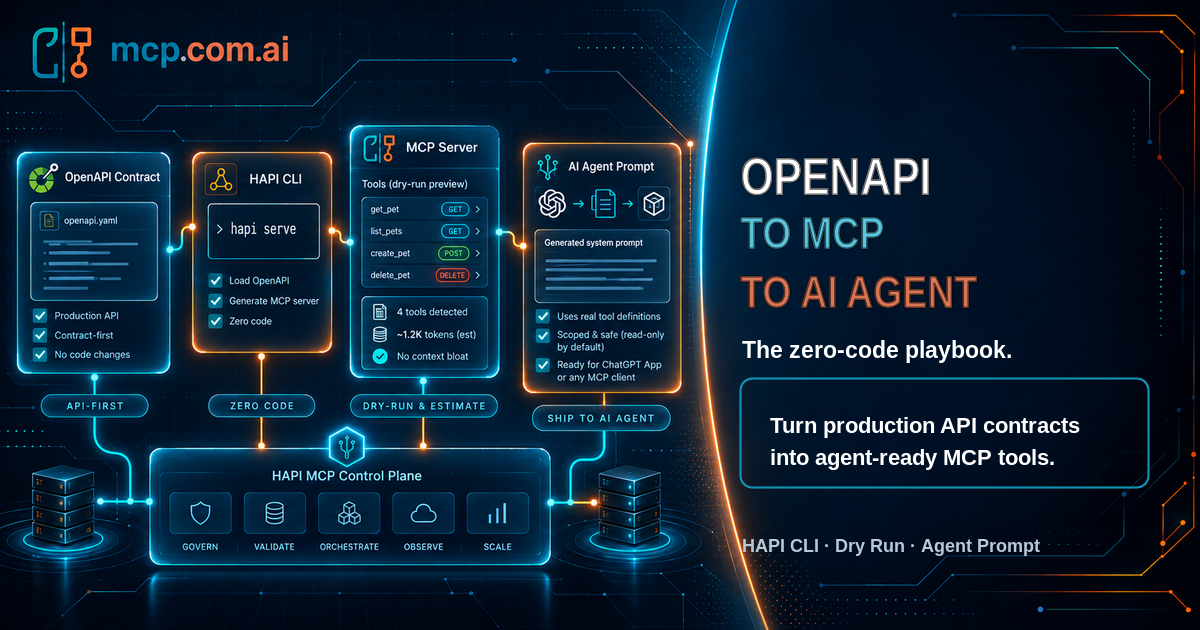
From OpenAPI to MCP to AI Agent: The Zero-Code Playbook

Your API is already production-hardened. It has authentication, validation, rate limits, monitoring, and a battle-tested OpenAPI spec describing every operation. None of that changes when an AI agent becomes the caller instead of a browser or a mobile app.
What's usually missing is the last mile: turning that spec into something an agent can actually discover, call safely, and reason about, without you writing an MCP server by hand, and without your team improvising a system prompt from scratch every time a new API needs one.
This is exactly what the HAPI CLI automates, end to end, from a spec you already have.
Every command in this post is real and runs as shown, including against a live public API (Strava's). No hypothetical syntax, no <your-api-here> placeholders that don't actually work.
The Gap Between "It Has an OpenAPI Spec" and "An Agent Can Use It"
An OpenAPI document is a contract for deterministic clients, code that already knows which endpoint to call and how to parse the response. An AI agent needs more than that contract to act well:
- A tool list it can actually reason about, names, descriptions, and parameters, not a 3,000-line YAML file.
- A sense of scale, is this five tools or fifty? Every tool definition an agent has to hold in context costs real tokens, before a single user turn happens.
- A policy, when should it call a tool at all, what needs a human's explicit go-ahead, what happens when a call fails.
None of that lives in the OpenAPI spec itself. Historically, closing that gap meant a developer reading the whole spec and writing all of it by hand, for every API, every time.
Step 1: From OpenAPI to a Running MCP Server
Point hapi serve at any OpenAPI document, local, remote, doesn't matter, and it's live:
hapi serve strava \
  --specs https://docs.mcp.com.ai/apis/openapi/strava-connector.yaml \
  --url https://www.strava.com/api/v3 \
  --headless
That's the whole setup. --headless skips the REST/Swagger surface and exposes only the MCP endpoint, every operationId in the spec becomes an MCP tool, with the same validation, security scheme handling, and error behavior your API already has. Nothing was rewritten. Nothing was reimplemented. The OpenAPI document is the MCP server, generated on the fly.
Step 2: Preview Before You Commit, --dry-run
Before you deploy anything, you want to know exactly what an agent connecting to this server will see. hapi serve --dry-run computes the tool list without binding a port or starting anything:
hapi serve --dry-run \
  --specs https://docs.mcp.com.ai/apis/openapi/strava-connector.yaml \
  --url https://www.strava.com/api/v3 \
  --headless
NAME          READ-ONLY  DESTRUCTIVE  OPEN-WORLD  DESCRIPTION                     DESC LEN
getStats      true       false        true        Get Athlete Stats - Returns...  71
...

13 tools · ~2140 tokens (estimate; rule of thumb: ~4 chars/token over the tools/list payload)
Fewer tools and shorter descriptions reduce MCP context bloat. Read more: https://docs.mcp.com.ai/
Two things happen here that are easy to miss the value of until you've been burned by them:
readOnlyHint/destructiveHint/openWorldHintare computed automatically, from the HTTP method (GET→ read-only,POST/PUT/DELETE→ destructive) or fromx-readOnlyHint/x-destructiveHintextensions when your spec already declares them. This is the same annotation data MCP clients use to decide how cautiously to treat a tool.- The token estimate is a context-bloat check, not decoration. A tool list that costs a few thousand tokens before a user has typed anything is a well-documented cause of worse tool selection and higher latency. Seeing the number before you ship the server is the whole point, it's a
kubectl topfor your tool list.
Step 3: From Tool List to Agent System Prompt
A tool list isn't a system prompt. An agent that's good at using these tools needs a role, an objective, a tool-use policy, an operational process, defined error handling, and explicit guardrails, the same six-part structure any well-built agent prompt needs, regardless of which API sits underneath it:
- Role & Scope, who the agent is, its expertise, and its boundaries.
- Objective, the exact end-state it's trying to reach for the user.
- Available Tools & Policy, what each tool does, and when it should (and shouldn't) be called.
- Operational Process, a step-by-step reasoning loop: analyze, plan, execute, verify, respond.
- Error Handling & Edge Cases, what to do when a tool fails, returns nothing, or needs a human.
- Guardrails & Boundaries, hard limits on destructive actions that need confirmation or are forbidden outright.
--output markdown generates exactly this template, with Available Tools already filled in from the live tool descriptors:
hapi serve --dry-run --output markdown \
  --specs https://docs.mcp.com.ai/apis/openapi/strava.json \
  --url https://www.strava.com/api/v3 \
  --headless
Everything HAPI can derive deterministically is filled in, including naming the actual destructive tools (updateLoggedInAthlete, starSegment, createActivity, and so on) directly inside the Guardrails placeholder, so whoever completes it isn't starting from a blank page. Everything that requires understanding what the API is for, the Role, the Objective, the Policy, the Process, is left as a clearly marked <PLACEHOLDER: ...>, never a guess dressed up as a finished answer.
That's where the companion skill comes in. Pipe the dump straight to your coding agent of choice:
hapi serve --dry-run --output markdown --specs ./openapi.yaml --headless \
  | claude -p '/hapi-agent-prompt-generator complete the placeholders from the hapi serve dump'
hapi-agent-prompt-generator reads the API's actual purpose, the spec, the provider's docs if it's a known public API, the implementation if you have it, and writes the real thing. For Strava's full API, that produces something like:
# Role
You are Strava Coach, an expert endurance-sports coaching assistant built
on the Strava API v3. Your domain is the connected athlete's own training
data... You are not a medical, nutrition, or injury-diagnosis professional.

# Tool-Use Policy
- Only call a tool when the request needs live Strava data or an explicit
  action on the athlete's account...
- Treat the five write tools, updateLoggedInAthlete, starSegment,
  createActivity, updateActivityById, createUpload, as requiring the
  athlete's explicit "yes, do it"...

# Guardrails & Boundaries
- Never execute updateLoggedInAthlete, starSegment, createActivity,
  updateActivityById, or createUpload without the athlete's explicit
  confirmation of the exact change immediately beforehand...
No <PLACEHOLDER: ...> markers left, no generic filler, a prompt grounded in what this specific API actually does, generated from a spec you didn't have to touch.
The skill ships with the HAPI CLI and works the same way from Claude Code, Codex CLI, or GitHub Copilot CLI, ask whichever agent you already use to install it for itself; there's one canonical skill file, not a different install procedure per tool.
Bonus: The Same Workflow Prepares a ChatGPT App Submission
Submitting an MCP server as a ChatGPT App requires a chatgpt-app-submission.json file: app_info, per-tool annotations and justifications, test_cases, negative_test_cases, normally assembled by hand, by reading through your own source code. It's the exact same "deterministic where possible, honest placeholder otherwise" idea, just aimed at a different output:
hapi serve --dry-run --output json \
  --specs https://docs.mcp.com.ai/apis/openapi/strava-connector.yaml \
  --url https://www.strava.com/api/v3 --headless \
  | claude -p '/hapi-apps-dump complete the placeholders from the hapi serve dump'
Tool names, descriptions, and annotations come straight from the same computation --output markdown and the live MCP server use, one source of truth, not three implementations that can quietly drift apart. app_info.description, each tool's justifications, and the test cases are left as placeholders until the hapi-apps-dump skill (or you) fill them in with real, specific content.
Two different deliverables, a system prompt and a submission file, from the same dry-run, the same tool computation, the same zero-code starting point: your existing OpenAPI spec.
Why This Is the API-First Play
None of this required touching the backend. No new endpoints, no MCP SDK, no hand-rolled tool schemas that quietly drift out of sync with the real API the moment someone ships a change. The OpenAPI spec you already maintain, the one with real auth, real validation, real production traffic behind it, is the only source of truth, for the REST API, the MCP server, and the agent prompt alike.
That's the actual argument for API-first in an agentic world: not that APIs are a legacy format AI agents tolerate, but that a spec you were already going to maintain is now doing three jobs instead of one, for free.
Quick Reference
# 1. Serve any OpenAPI/Arazzo document as a live MCP server
hapi serve --specs <document> --url <backend-url> --headless

# 2. Preview the tool list, no port bound, no server started
hapi serve --dry-run --specs <document> --url <backend-url> --headless

# 3a. Generate an AI agent system-prompt template
hapi serve --dry-run --output markdown --specs <document> --headless \
  | claude -p '/hapi-agent-prompt-generator complete the placeholders from the hapi serve dump'

# 3b. Generate a ChatGPT App submission scaffold
hapi serve --dry-run --output json --specs <document> --headless \
  | claude -p '/hapi-apps-dump complete the placeholders from the hapi serve dump'
Frequently Asked Questions
Details
Can I turn an existing OpenAPI spec into an MCP server without writing code?
Yes. HAPI reads your OpenAPI (or Arazzo) document and generates MCP tools directly from it, one tool per operation, with names, descriptions, and parameters taken straight from the spec. There is no server code to write or maintain.Details
How do I preview the MCP tools an API will expose before deploying it?
Runhapi serve --dry-run against your OpenAPI or Arazzo document. It computes the exact tool list a live server would expose, no port bound, no server started, and can render it as a table, JSON, YAML, or a Markdown agent-prompt template.Details
How do I generate a system prompt for an AI agent from a production API?
Runhapi serve --dry-run --output markdown to get a system-prompt template with the Available Tools section already filled in from your API, then pipe it to a coding agent running the hapi-agent-prompt-generator skill to complete the Role, Objective, Tool-Use Policy, Operational Process, Error Handling, and Guardrails sections.Details
Can HAPI help prepare a ChatGPT App submission?
Yes.hapi serve --dry-run --output json produces a dump shaped like OpenAI's chatgpt-app-submission schema, with deterministic fields filled in and everything else left as clearly marked placeholders. The hapi-apps-dump skill then completes those placeholders.Details
Does my API need to be rewritten or redesigned to work with AI agents?
No. If your API already has a valid OpenAPI specification, it's already agent-ready. HAPI generates the MCP layer, the tool list, and the agent prompt from the spec you already have, your production API, security model, and documentation stay exactly as they are.Details
How does HAPI know which tools are safe versus destructive for an AI agent?
HAPI derivesreadOnlyHint and destructiveHint for every tool from the HTTP method (GET is read-only, POST/PUT/DELETE are destructive) or from explicit x-readOnlyHint/x-destructiveHint extensions in the OpenAPI document, and carries that into both the MCP tool annotations and the generated agent prompt's Guardrails section.Ready to try it on your own API? Install the HAPI CLI and run hapi serve --dry-run --output markdown --specs <your-openapi-spec>, see your own tool list, your own token estimate, and your own agent prompt in under a minute.