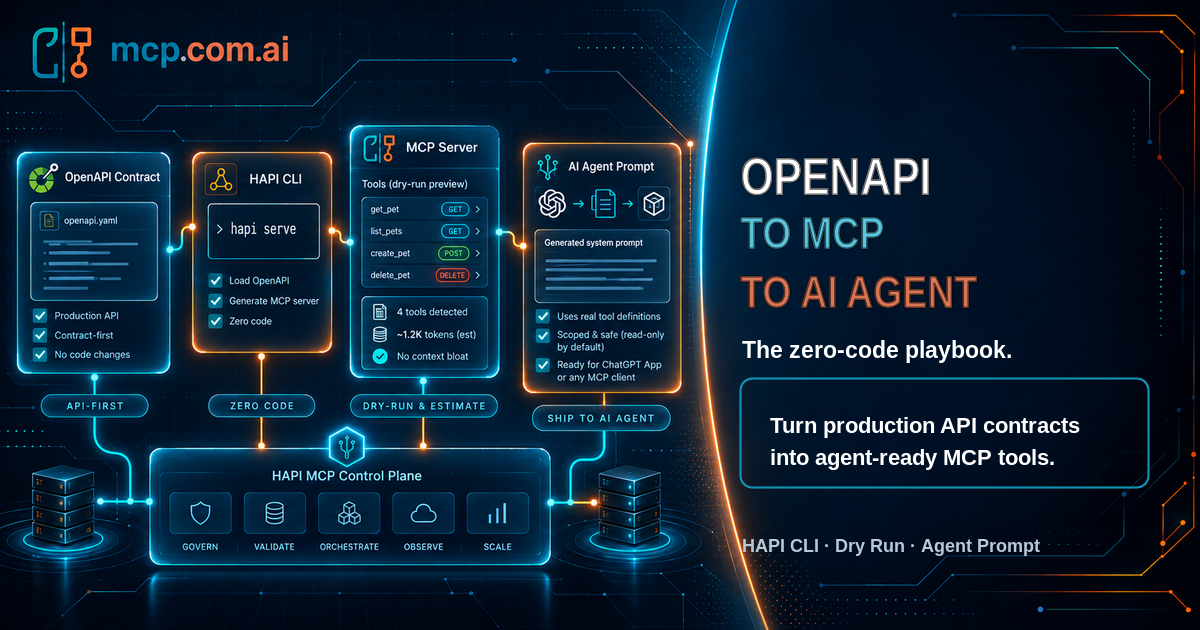
Your API is already production-hardened. It has authentication, validation, rate limits, monitoring, and a battle-tested OpenAPI spec describing every operation. None of that changes when an AI agent becomes the caller instead of a browser or a mobile app.
5 publicaciones etiquetados con "Guide"
Curated instructions or documentation designed to help users understand and implement specific use cases around MCP and related technologies.
Ver Todas las Etiquetas
Setting up a Model Context Protocol (MCP) server is easier than you might think! It is a straightforward process that doesn't require extensive DevOps skills. Whether you're testing, packaging, or scaling globally, the HAPI MCP Stack equips you with everything you need to launch your server in just seconds.
In this guide, we'll explore 4 different ways to run and deploy MCP servers using the HAPI CLI.
Bonus: Agent Skills provided to automate MCP server deployment.
You want your API to be instantly usable inside AI assistants like ChatGPT, and Web UIs. The OpenAI UI SDK plus the Model Context Protocol (MCP) lets you expose your API as structured tools that large language models can call directly.

This guide demonstrates how to use the OpenAI Response API to integrate with the Model Context Protocol (MCP) for seamless, AI-driven API interactions. You will learn how to generate a REST API specification with Postman's AI Agent, deploy it as an MCP server using HAPI Server, and connect it through OpenAI's Response API for testing.

An evolution of tool calling with MCP, thanks to OpenAI's latest SDK updates.
Step-by-step, I'll guide you through setting up an MCP server, integrating it with the OpenAI SDK, and running a complete example that showcases dynamic tool calling. By the end of this post, you'll be equipped to leverage MCP in your own OpenAI-powered applications.